How to use this Medical Record Summary Template
Our free medical records summary template is straightforward to use, but follow these simple steps to ensure you understand how to complete each section.
Step 1: Download the Medical Record Summary Template
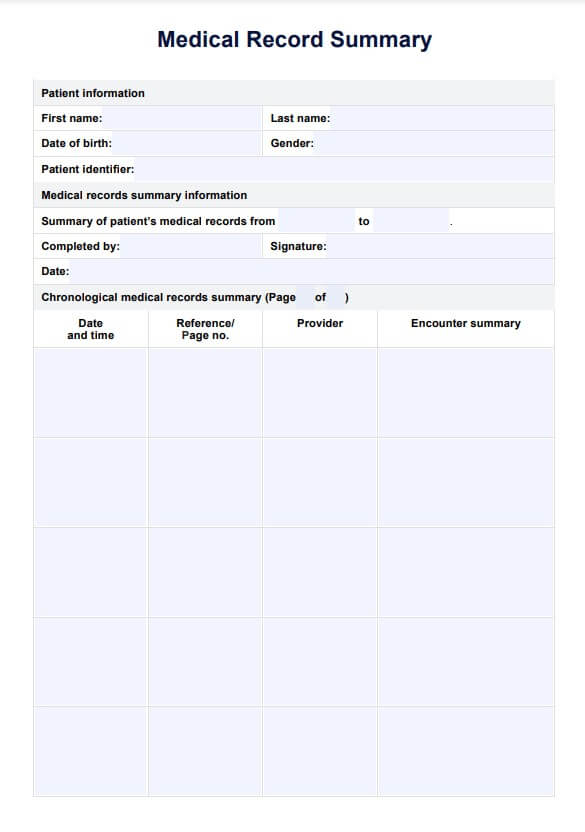
The first step is to download the Medical Record Summary Template. You can download the free PDF version using the link on this page or find it and many others from Carepatron's community template library. Don't worry about fitting in all the information on the first page. You can make as many copies of the second page of the PDF as you need for your medical summary report and number them once you are finished.
Step 2: Fill in the patient information
Once you have a copy of the template, fill in the patient information and medical records summary information sections. These sections note essential details such as the patient's name and date of birth, the dates this summary will encompass, and who has conducted the summary. Knowing the patient's personal history is essential in documenting incidents and previous treatments, supporting medical evidence, and thorough evaluations. As a medical record summary may often be used in legal cases as medical evidence, these details must be accurate, so extra care must be taken in filling them in.
Step 3: Work through the medical record chronologically
The large table on the first page is for a healthcare professional to summarize medical records. This should be completed chronologically, with the earliest entry at the top of the table. Add the date and time, the part of the patient's medical record you referenced, the provider of the service in question, and a summary of the encounter.
Keep working down the table chronologically, adding all the pertinent aspects of the patient's medical record related to the medical summary request.
Step 4: Add page numbers
To ensure this Medical Record Summary Template is only shared in its entirety, add the page numbers and the total number of pages on each page. Put "Page 1 of 1" if you have only used one page. In our medical record sample, two pages were used by the healthcare professional.
Step 5: Sign and store securely
The last step is to sign and add your name to the first page and store the document securely, as it contains confidential patient health information. Often, this summary would have been created to be shared with another provider or third party, and in this case, you should ensure it is shared securely and that you have been authorized to disclose the patient's health information. Conducting medical record reviews regularly is also essential.